Should You Opt Out of AI Resume Screening
You’ve submitted your resume to 50+ companies. Your experience is solid. Your qualifications match the job descriptions perfectly. Yet weeks pass, and you hear nothing but automated rejection emails or worse, complete...
You’ve submitted your resume to 50+ companies. Your experience is solid. Your qualifications match the job descriptions perfectly. Yet weeks pass, and you hear nothing but automated rejection emails or worse, complete silence.
Then you notice it: a small checkbox on the application form asking if you’d like to “opt out of AI resume screening.” You pause. Should you check it? Will opting out give you a better chance at a human review, or will it send your application into a black hole?
For most mid-career professionals, staying in the AI screening system is the smarter choice. Modern applicant tracking systems (ATS) process hundreds of resumes efficiently, and opting out often means your application gets deprioritized or never reviewed at all, especially at large companies.
However, specific situations like non-traditional career paths, small company applications, or strong internal referrals may warrant opting out.
This guide breaks down everything you need to know about AI resume screening: how it works, when opting out makes sense, and proven strategies to optimize your resume for both AI systems and human recruiters.
Whether you’re applying to Fortune 500 companies or nimble startups, you’ll learn exactly how to navigate this critical hiring gatekeep.
What is AI Resume Screening and How Does It Actually Work?
AI resume screening has transformed how companies evaluate job candidates. But what exactly happens when you click “submit” on a job application?
The Technology Behind Applicant Tracking Systems (ATS)
At its core, an Applicant Tracking System (ATS) is software that organizes and manages job applications. Think of it as a sophisticated database that stores resumes, tracks candidates through the hiring pipeline, and helps recruiters manage hundreds or thousands of applications simultaneously.
Modern AI-powered screening goes several steps further. These systems use natural language processing (NLP) to understand context, not just match keywords.
They employ machine learning algorithms that learn from past successful hires to predict which candidates might perform well. Some advanced systems even conduct sentiment analysis to evaluate the tone and confidence level in your resume writing.
The key difference: Traditional ATS systems simply store and organize resumes. AI screening actively evaluates, scores, and ranks candidates before any human sees your application.
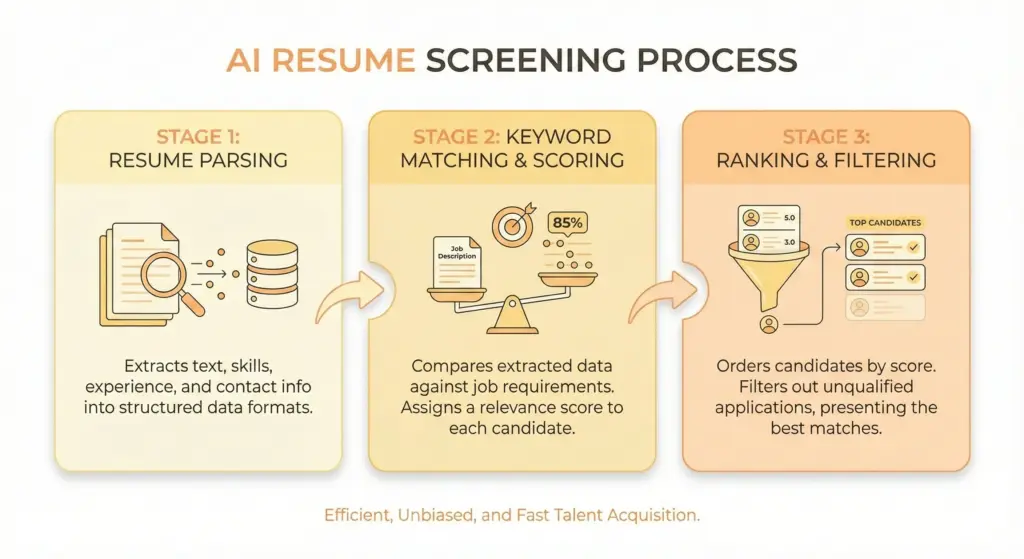
The Three-Stage AI Screening Process
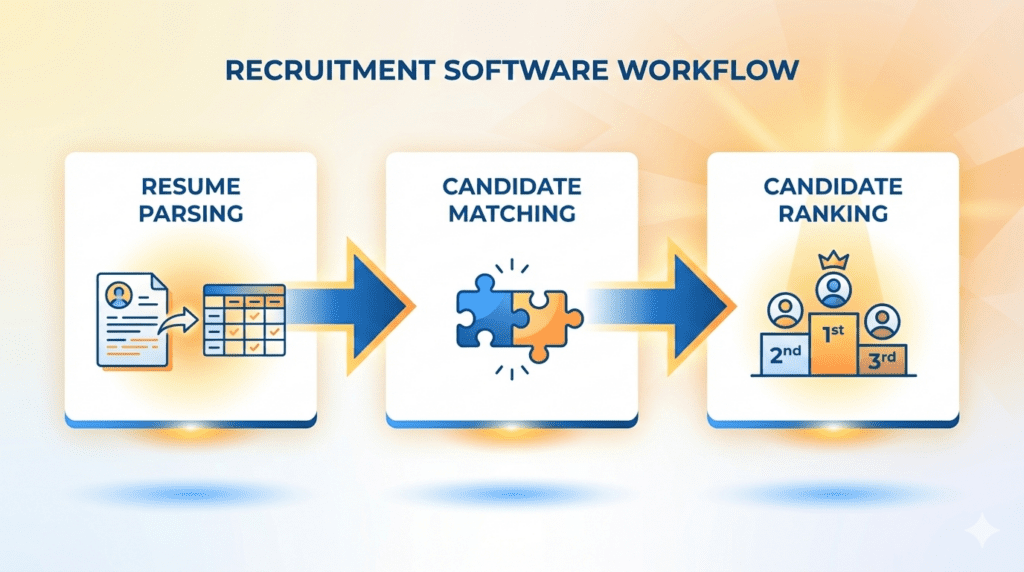
Stage 1: Resume Parsing
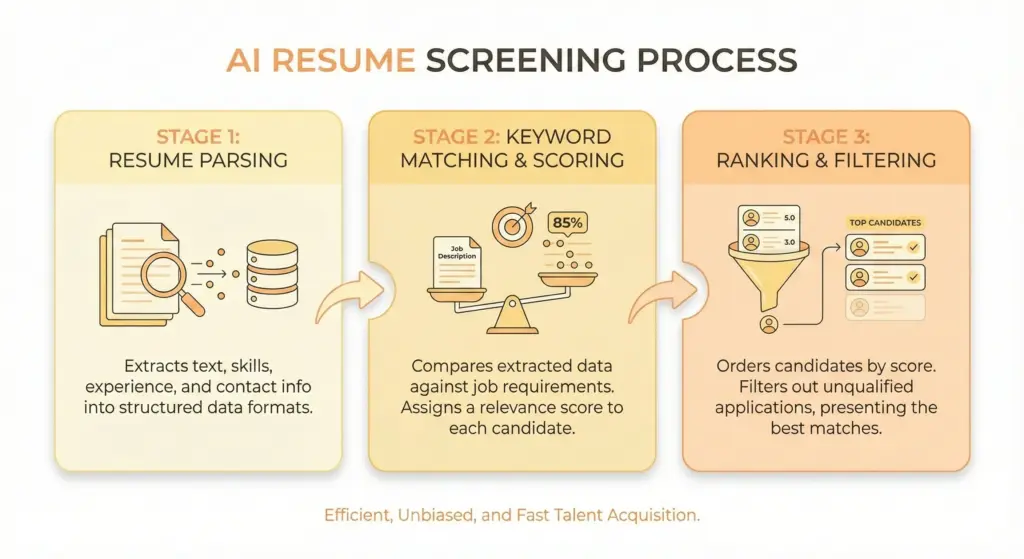
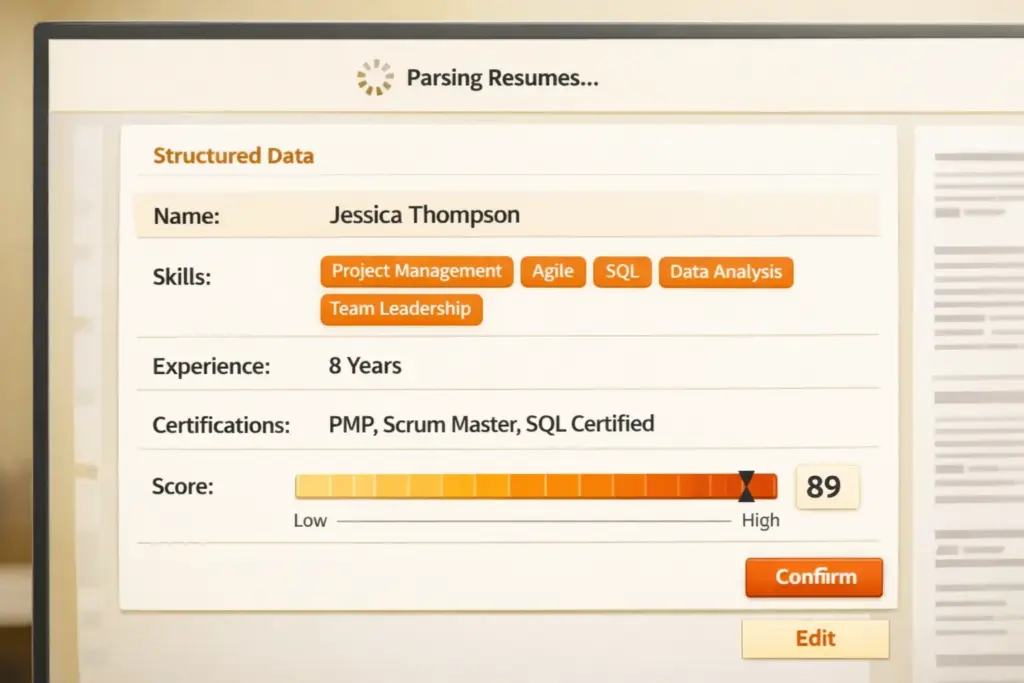
The moment you submit your resume, AI software extracts structured data from your document. It identifies your name, contact information, work history, education, skills, and achievements. This parsing process converts your beautifully formatted resume into raw data the system can analyze.
Here’s where many resumes fail: If your formatting is too complex using tables, text boxes, or graphics, the AI might misread or completely miss critical information. A resume that looks perfect to human eyes can appear as gibberish to parsing software.
Stage 2: Keyword Matching & Scoring
Next, the AI compares your parsed information against the job requirements. It searches for specific skills, technologies, certifications, and experience levels mentioned in the job description. But modern AI doesn’t just count keywords, it understands synonyms, related terms, and contextual relevance.
For example, if a job description requires “project management,” the AI recognizes related terms like “program coordination,” “cross-functional leadership,” or “Agile methodology.” Each resume receives a relevance score, typically ranging from 0-100%, based on how closely it matches the role’s requirements.
Stage 3: Ranking & Filtering
Finally, the system ranks all candidates from highest to lowest match scores. Recruiters typically review only the top 10-20% of applicants and sometimes as few as the top 10-15 candidates from a pool of 300+ applications. If your resume scores in the bottom 80%, a human recruiter may never see it, regardless of your actual qualifications.
This is why understanding AI screening is critical. You’re not just competing against other candidates; you’re first competing against an algorithm.
What Does “Opting Out of AI Resume Screening” Actually Mean?
When you see an opt-out checkbox on a job application, what are you really choosing?
Two Scenarios When You See the Opt-Out Option
Scenario 1: True Manual Review Option (Rare)
Some companies, typically smaller organizations or those in highly specialized fields, genuinely offer manual review as an alternative to AI screening. In these cases, your resume goes into a separate queue for direct human review.
However, this is increasingly rare. Only about 15-20% of opt-out options lead to dedicated manual review processes.
Scenario 2: Legal Compliance Notification (Common)
More often, the opt-out option exists because of regulatory requirements. New York City’s Local Law 144 requires employers to conduct annual bias audits and disclose AI usage. Similar regulations exist under GDPR in Europe and emerging laws in other jurisdictions.
In these cases, opting out may not guarantee human review, it simply documents your preference and ensures legal compliance for the employer.
What Happens When You Opt Out?
Here’s what typically occurs when you check that opt-out box:
Your resume enters a manual review queue. This sounds positive, but there’s no guarantee about timing or thoroughness. While AI-screened candidates might get initial scoring within hours, manually reviewed applications could sit untouched for weeks.
You may be deprioritized in high-volume hiring. When a company receives 300 applications and needs to fill a position quickly, recruiters focus on the AI-scored candidates first. The manual review pile becomes a “maybe later” stack that often never gets proper attention.
It does NOT guarantee fairer evaluation. Human reviewers bring their own biases, conscious and unconscious. Human reviewers bring their own biases and can fall into traps like scanning too quickly, especially when overwhelmed with applications.
Platform-Specific Guidance
LinkedIn: Most LinkedIn applications flow through corporate ATS systems. The opt-out option, when present, typically relates to LinkedIn’s own candidate matching algorithms. Your application still enters the employer’s ATS regardless of your choice.
Indeed: Indeed offers functionality that sorts candidates based on employer criteria, but employers can view all applicants at any time. The platform’s AI helps rank candidates, but doesn’t block anyone from employer view.
Company Career Portals (ADP, Workday): ADP applicants can decline evaluation through Candidate Relevancy assessment tools on a per-job basis. However, the Mobley v. Workday lawsuit became the first major class action against AI hiring discrimination, leading many companies to offer opt-out options primarily for legal protection.
The key insight: The opt-out option exists more for legal compliance than as a genuine alternative pathway to employment.
Should You Opt Out of AI Resume Screening? The Decision Framework
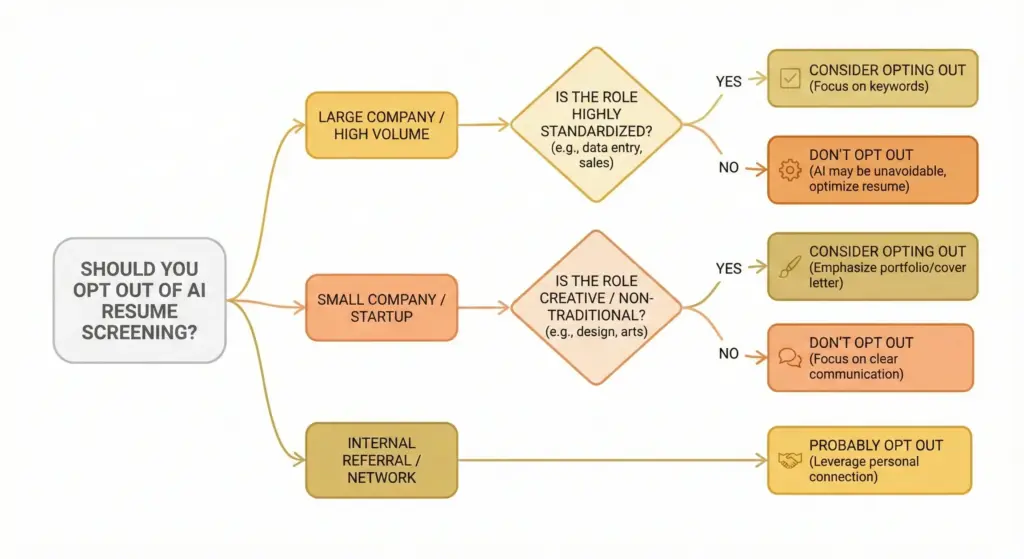
There’s no one-size-fits-all answer to whether you should opt out of AI resume screening. Your decision should be based on your specific circumstances, the company you’re applying to, and your career situation. Use this framework to make an informed choice.
When You SHOULD Consider Opting Out
Scenario 1: Non-Traditional Career Path
If your career journey doesn’t follow a straight line, AI algorithms might miss the value you bring. Career changers with transferable skills, professionals with employment gaps due to family care or health issues, or those with freelance-heavy work histories often struggle with AI screening.
A real person will better understand an unconventional career path and can evaluate context that AI cannot. For example, if you spent three years as a freelance marketing consultant and are now applying for a full-time marketing director role, the AI might flag the gap or irregular job titles. A human recruiter can understand that your diverse client experience actually makes you more qualified, not less.
Employment gaps that you can explain (returning to school, caring for a family member, recovering from illness, or starting a business) require human empathy and context that AI systems simply cannot provide.
Scenario 2: Applying to Small Companies or Startups
Small business with few employees unlikely to have invested in AI screening. Companies with fewer than 50 employees often don’t use sophisticated ATS systems. Your application likely goes directly to the founder, hiring manager, or a small HR team.
In these environments, opting out makes little difference because they’re reviewing applications manually anyway. The personal approach is more valued at startups, where cultural fit and personality often matter as much as technical qualifications.
Scenario 3: You Have a Strong Internal Referral
This is perhaps the most compelling reason to consider opting out. Referred candidates are four times more likely to get hired than those applying cold through online portals.
When someone internally vouches for you, your application should bypass standard screening entirely. If you have a direct connection to the hiring manager or a strong internal advocate, mention this prominently in your application and consider opting out to ensure your referral gets proper weight.
However, many companies still route even referred candidates through their ATS for compliance and record-keeping. In these cases, your referral note in the system matters more than the opt-out choice.
Scenario 4: Highly Creative or Niche Specialized Roles
For designers, researchers, architects, or highly specialized technical roles, your portfolio or body of work matters infinitely more than resume keywords.
AI screening systems excel at evaluating standardized experience but struggle to assess creativity, design thinking, or specialized domain expertise that doesn’t translate well to keywords.
If you’re a UX designer, your portfolio showcasing real projects demonstrates your capabilities better than any resume bullet point. If you’re a research scientist with publications, your citation record and research impact carry more weight than whether your resume mentions specific lab techniques.
Scenario 5: Legitimate Bias Concerns
The research on AI bias in hiring is troubling. AI systems favored white-associated names 85% of the time versus Black-associated names 9% of the time, according to University of Washington researchers. Black male candidates were never favored over white male candidates in their study of major AI language models.
Similarly, male-associated names favored 52% of the time versus female-associated names 11% of the time. If you belong to a demographic group that research suggests may be disadvantaged by AI screening, opting out could give you a fairer evaluation though human bias exists too.
When You Should NOT Opt Out (Stay In the System)
Scenario 1: Large Company or High-Volume Roles
If you’re applying to Fortune 500 companies or any organization receiving hundreds of applications per role, staying in the AI screening system is almost always the right choice.
Your opt-out request could land at the bottom of a virtual pile that never gets reviewed. Enterprise companies in tech, finance, healthcare, and consulting rely heavily on AI screening because they simply cannot manually review the volume of applications they receive.
When a company receives 500 applications for a software engineering role, they might review the top 20 AI-ranked candidates and stop there. Opting out means you’re likely not in that top 20 review pool.
Scenario 2: Competitive Job Markets
In hot job markets or for highly desirable positions, AI screening is often the ONLY first-round filter. Manual review queues at these companies are rarely, if ever, checked.
Your best strategy: Optimize your resume for AI, get ranked in the top tier, and let the system work for you rather than against you.
Scenario 3: Your Resume is Already ATS-Optimized
If you’ve invested time in proper resume formatting, strategic keyword integration, and quantified achievements, you’re likely to score well in AI screening. Why opt out of a system you’re positioned to beat?
When your resume includes relevant technical skills, uses standard section headers, and mirrors the language from job descriptions, AI screening actually works in your favor by quickly identifying you as a strong match.
Scenario 4: Standard Career Progression
If you have a linear career path in one industry with clearly relevant experience, AI screening will easily recognize your qualifications. A marketing manager with 8 years of progressive marketing experience applying for a senior marketing manager role is exactly the kind of candidate AI systems identify quickly and accurately.
There’s no reason to opt out when the algorithm will correctly flag you as highly qualified.
The Reality Check
88% of employers think they’re losing out on qualified candidates because resumes weren’t “ATS-friendly”.
This statistic reveals something important: the problem usually isn’t that AI screening is fundamentally flawed, but that candidates don’t understand how to optimize for it.
Before deciding to opt out, invest time in understanding how to make your resume AI-friendly. For most mid-career professionals, this is a more effective strategy than hoping for manual review.
The Pros and Cons of AI Resume Screening (What Job Seekers Need to Know)
Understanding both sides of AI screening helps you make better decisions about your job search strategy.
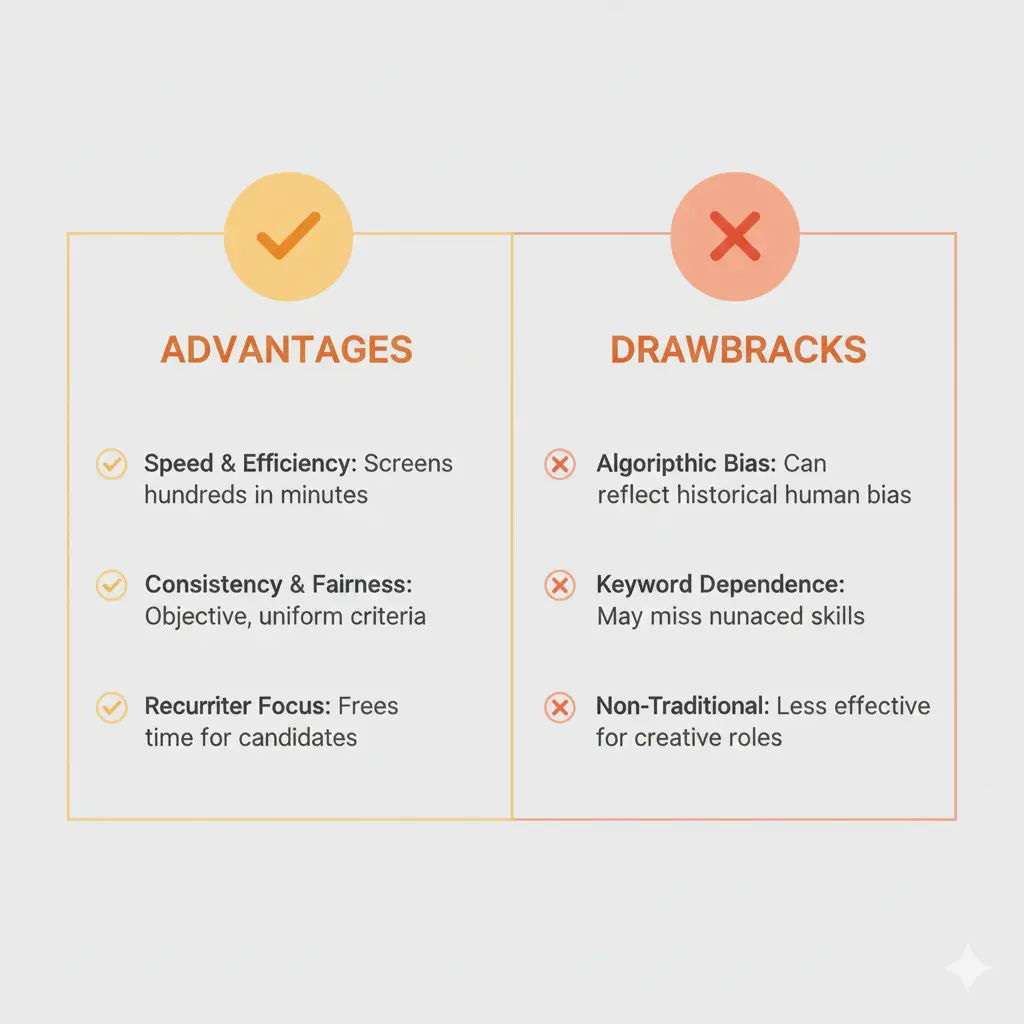
The Advantages of AI Resume Screening
For Job Seekers:
Faster initial response times mean you know sooner whether you’re advancing. While manual screening could take weeks, AI processes applications within hours or days, accelerating the entire hiring timeline.
AI reduces certain types of human unconscious bias in theory. A well-designed AI system doesn’t care where you went to college or whether you have a “prestigious” company name on your resume. It evaluates based on skills and qualifications match.
The objective evaluation based on qualifications means every candidate gets measured against the same criteria. Your resume submitted at 9 AM gets the same consideration as one submitted at 9 PM, unlike human reviewers who may be tired or distracted.
For the Hiring Process:
More candidates reviewed fairly means deserving applicants don’t get overlooked simply because they were application #247 in a stack. Consistent evaluation criteria help standardize what would otherwise be highly subjective human judgment. AI reduces recruiter burnout by handling the initial heavy lifting, and data-driven insights help companies improve their hiring over time.
[Related reading: How to Screen Resumes Effectively]
The Drawbacks and Risks
Job Seeker Concerns:
Keyword overemphasis is real. AI often feels like a competition of “keyword bingo“, where having the exact right terminology matters more than demonstrable competence.
Lack of context means AI cannot understand nuance, career pivots, or unique situations that make you qualified despite an unconventional background. The black box problem leaves you with no transparency about why you were rejected, you just get a generic email or silence.
Documented bias exists despite claims of objectivity. The University of Washington research cited earlier shows systematic preferences based on name associations. These aren’t hypothetical concerns, they’re measurable patterns affecting real candidates.
System Limitations:
False negatives are common; qualified candidates filtered out because they used “customer success” instead of “client relations” or other minor terminology differences. AI cannot evaluate soft skills, cultural fit, or potential the way experienced recruiters can.
Formatting errors cause misreads. A beautifully designed resume with graphics and tables might appear as scrambled nonsense to parsing software. Generic resumes fail regardless of qualifications because they lack the specific keywords and measurable achievements AI systems prioritize.
The key is understanding these limitations so you can work within them strategically rather than being blindsided by them.
Why 83% of Companies Now Use AI to Screen Resumes in 2025
The adoption of AI resume screening has exploded. 83% of companies plan to use AI for resume screening by 2025, representing a massive shift in how hiring happens.
Why the rapid adoption? The numbers tell the story.
The average recruiter today manages 56% more open positions than five years ago, while receiving 2.7 times more applications per role. For a single mid-level position, companies routinely receive 200-400 applications.
Manually reviewing each resume for 2-3 minutes adds up to 10-20 hours of screening time per role, time most HR departments don’t have.
AI screening reduces hiring costs by up to 30% per hire while compressing processes that once took weeks into mere days. 70% of companies will use AI in their overall hiring process by 2025, extending beyond resume screening to interview scheduling, candidate communications, and even initial video interviews.
The Business Case for AI Resume Screening
Volume Problem: Remote work eliminated geographic boundaries. A job posting in New York now attracts candidates from around the world. Companies need scalable solutions to manage this influx without expanding HR teams proportionally.
Efficiency Demands: In competitive markets, slow hiring means losing top talent to faster competitors. AI screening reduces time-to-hire from an average of 42 days to as few as 28 days, giving companies a critical advantage.
Consistency in Evaluation: Human recruiters have good days and bad days. They get tired reviewing the 200th resume. They unconsciously favor candidates from familiar schools or companies. AI provides consistent evaluation criteria, applying the same standards to every candidate regardless of when their application was received.
Data-Driven Hiring Decisions: AI systems can analyze which candidate attributes correlate with successful hires, helping companies refine their hiring criteria based on actual performance data rather than intuition or assumptions.
For recruiters and HR professionals, AI screening isn’t just convenient and it’s becoming essential infrastructure for modern talent acquisition. Understanding this from both sides of the hiring equation helps you navigate the system more effectively. Therefore, recruiters should learn how AI can improve their recruiting and help them find perfect candidates for the role.
How to Optimize Your Resume for AI Resume Screening (Without Losing Authenticity)
Whether you opt out or not, these strategies help you succeed in modern hiring. The goal isn’t to trick the system, it’s to ensure AI accurately recognizes your qualifications.
The 5-Step ATS Optimization Framework
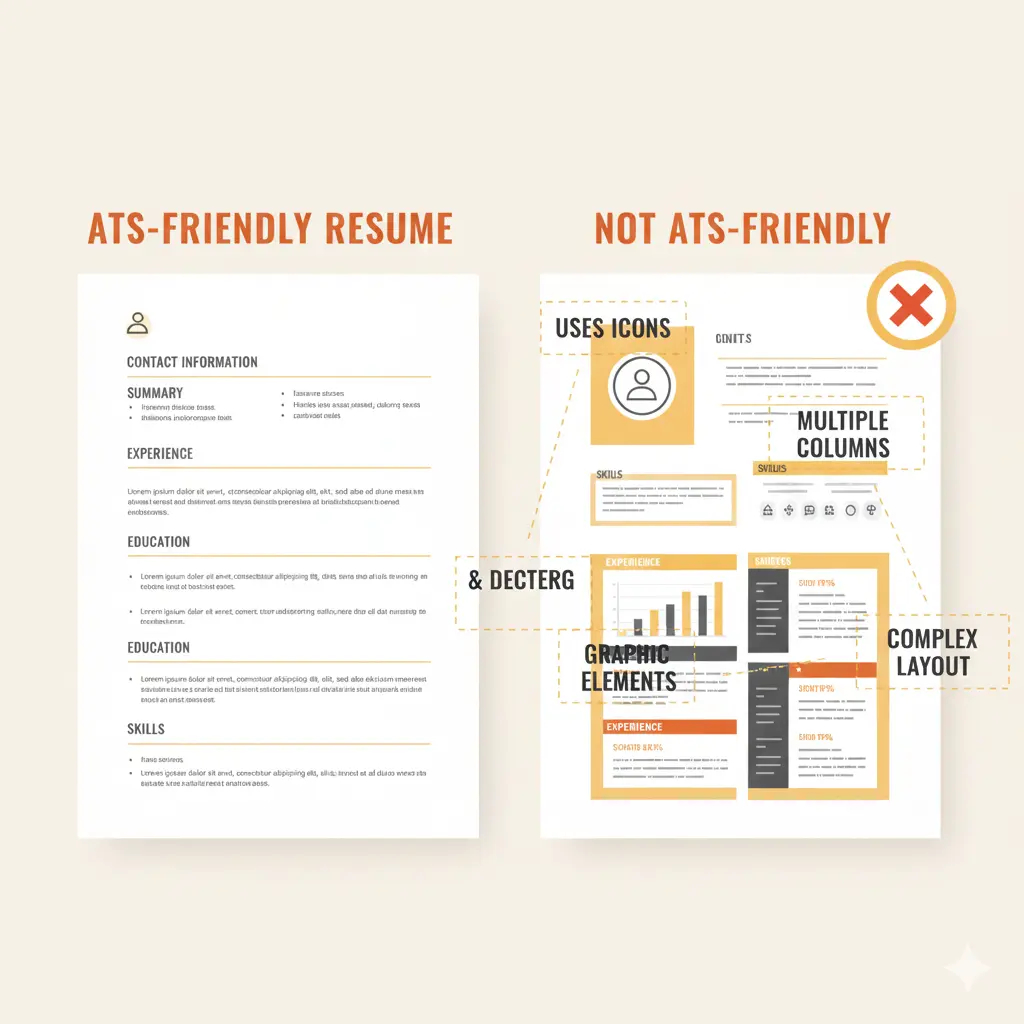
Step 1: Use the Right Format and Structure
Start with the fundamentals that AI parsing engines require:
Use standard section headers: “Work Experience,” “Education,” “Skills,” “Certifications.” Creative headers like “Where I’ve Made an Impact” or “My Journey” confuse parsing software.
Avoid tables, text boxes, headers/footers for critical information, and multi-column layouts. These formatting elements look clean to humans but create parsing chaos for AI.
Keep a simple, clean layout with no graphics, images, logos, or headshots. Save your document as .docx or text-based PDF and never image-based PDFs or unusual formats. Stick with standard fonts: Arial, Calibri, Times New Roman, or similar widely recognised typefaces.
Step 2: Master Strategic Keyword Integration
Extract keywords directly from the job description, focus on skills, tools, qualifications, and required experience. Use the exact phrasing from the job posting whenever accurate. If they write “project management,” don’t substitute “managed projects.”
Include both acronyms and spelled-out terms: “ATS (Applicant Tracking System)” and “Search Engine Optimization (SEO)” on first use. This captures searches for either version.
Natural integration is crucial. Avoid keyword stuffing that makes your resume read like a checklist. The keywords should flow within meaningful achievement statements.
Action example: If the posting says “Project Management,” don’t just write “Managed project tasks.” Instead: “Led project management for 5 cross-functional initiatives, delivering all milestones on schedule and 15% under budget using Agile methodologies.“
[Related Reading: Core Competencies for Your Resume]
Step 3: Quantify Your Achievements
AI systems rank candidates higher when they see measurable impact. Use numbers, percentages, dollar amounts, timeframes, and scale indicators.
Results-driven bullet points should include before/after comparisons showing your impact. Provide scope indicators like team size, budget managed, or volume handled.
Example: “Led team of 12 engineers to increase platform efficiency by 35%, reducing processing time from 8 hours to 5.2 hours and saving $200K annually in infrastructure costs.”
This single bullet includes: team size (12), percentage improvement (35%), specific time reduction (8 to 5.2 hours), and cost impact ($200K). AI systems recognize and score these quantified achievements highly.
Step 4: Use Action Verbs and Accomplishment Statements
Start bullet points with strong action verbs: Led, Increased, Reduced, Launched, Transformed, Optimized, Implemented, Negotiated.
Focus on impact and results, not just responsibilities. Anyone can list job duties, top candidates show what they accomplished.
Use the STAR method mentally: Situation, Task, Action, Result. Even if you don’t write out every component, ensure each bullet conveys results.
Include industry-specific terminology that demonstrates insider knowledge. If you’re in tech, terms like “CI/CD pipeline,” “microservices,” or “API integration” show expertise. In marketing, “conversion rate optimization,” “customer acquisition cost,” or “marketing attribution” demonstrate domain knowledge.
Step 5: Tailor for Each Application
This is the most time-consuming step and the most important. Customize your resume for every single job application.
Match the job description language exactly. If they say “stakeholder management,” use that phrase rather than “client relations.” Prioritize relevant experience by reordering bullet points to put the most relevant achievements first.
Adjust your skills section based on what the role emphasizes, if they prioritize Excel expertise, ensure it’s prominent in your skills list.
Create a master resume with all your experience and achievements, then create tailored versions for each application that emphasize what matters most for that specific role.
Resume Formatting for AI: The Technical Checklist
| Do’s | Don’ts |
|---|---|
| ✓ Use standard section headers | ✗ No images, logos, or headshots |
| ✓ Left-align text (center headers are okay) | ✗ Avoid fancy fonts or colors |
| ✓ Use bullet points for accomplishments | ✗ No tables or columns for main content |
| ✓ Include hard + soft skills | ✗ Skip headers/footers for key info |
| ✓ Use conventional job titles | ✗ Don’t use creative job titles without translation |
| ✓ Add certifications + development | ✗ No embedded graphics, charts, infographics |
| ✓ Include your LinkedIn URL |
Free Tools and Resources to Test Your Resume Against AI Screening
Before applying to jobs, test your resume against AI screening systems to identify weaknesses.
AI Resume Scanners (Free)
Jobscan: Upload your resume and a specific job description to see match percentage, missing keywords, and formatting issues. The free version allows limited scans per month but provides detailed feedback.
Resume Worded: Get instant ATS compatibility scores and improvement suggestions. Their AI identifies weak action verbs, missing quantified achievements, and length issues.
VMock: Many universities offer free access to students and alumni. Provides AI-powered scoring on structure, language, impact, and presentation.
Teal: Build and test resumes with real-time ATS scoring. Their free tier includes basic optimization features and job tracking.
TopResume ATS Scanner: Quick free scan identifies critical ATS compatibility issues. Their paid services offer more detailed analysis.
Cvshelf: Check out your resume with our free plan and see what can be improved immediately.
How to Use These Tools Effectively
Upload your resume and target job description: Don’t test your resume in isolation, always pair it with specific job descriptions you’re targeting.
Review match percentage and feedback: Aim for 75%+ match scores. Below 70% means significant optimization needed.
Identify missing keywords: Look for skills, technologies, and terminology from the job description that don’t appear in your resume. Add them where genuinely relevant.
Fix formatting issues: Pay special attention to parsing errors, if the scanner can’t read your experience dates or job titles, neither can real ATS systems.
Re-scan until optimized: This is iterative. Make changes, re-scan, adjust again. Spend 2-3 hours perfecting your resume for each application category (not each individual job, but each type of role).
Conclusion: Making the Right Decision for Your Career
So, should you opt out of AI resume screening? After examining the research, frameworks, and real-world cases, here’s what matters most:
Key Takeaways Recap
AI screening is now the norm: 83% of companies will use it by 2025. This isn’t a trend you can avoid, it’s the new reality of hiring.
Opting out isn’t always better: It depends entirely on your situation. Most mid-career professionals benefit from staying in the AI system and optimizing properly rather than hoping for manual review that may never come.
The best strategy combines both: Optimize your resume for AI screening AND pursue human connections through referrals, direct outreach, and networking. Don’t choose one approach, use multiple strategies simultaneously.
Understand the bias risks but make informed decisions: Yes, AI bias exists and is documented. But human bias exists too. Neither is perfect. Focus on what you can control: optimization, networking, and persistence.
Test before applying: Use free ATS scanning tools to identify weaknesses before submitting applications. This single step significantly improves your success rate.
The Bottom Line
For most mid-career professionals: Stay in the AI screening system. Optimize your resume properly using the frameworks in this guide. Use alternative strategies, direct outreach, referrals, and portfolio building. Understand when opting out makes sense for YOUR unique situation, but recognize that for 70-80% of applications, staying in the system is optimal.
Final Action Steps
Today: Run your current resume through Jobscan or Resume Worded to establish your baseline score.
This week: Identify 5-10 target companies where you genuinely want to work. Research their hiring processes and application systems.
Before applying: Optimize your resume for each specific application, aiming for 75%+ match scores. Customize for the job description language and priorities.
For each application: Find 2-3 internal connections or relevant employees at each company. Request informational interviews or advice.
Always: Apply through the portal for official tracking AND reach out directly to hiring managers when possible. Track your applications, response rates, and which strategies work best for you. Iterate based on data.
Remember: The job search is a numbers game combined with strategy. You need both volume (enough applications) and quality (optimized applications with multiple touchpoints). Candidates who master this balance find opportunities faster and land better roles.
Need help creating an ATS-proof resume that still showcases your unique value? The strategies in this guide work, but they require time and attention to execute properly.
CVShelf’s screening technology helps from the other side too, ensuring recruiters using our system find qualified candidates like you, even when your background doesn’t perfectly match every keyword.
The future of hiring combines AI efficiency with human judgment. Position yourself to succeed in both dimensions, and you’ll cook in your career.
Frequently Asked Questions (FAQs)
No. Most candidates should stay in the system, opting out can sink your application at large companies where manual queues rarely get checked. Opt out only in specific cases: non-traditional career paths at smaller firms, strong internal referrals, creative roles where a portfolio matters more, or when you have a realistic alternative route to the hiring manager.
Large companies (500+ employees) and most Fortune 500 firms use automation; job boards and platforms like LinkedIn and Indeed also rank candidates with AI. Career portals (Workday, ADP) commonly include screening features. If unsure, ask the recruiter directly, it’s a fair, normal question.
No, never sacrifice readability. Integrate keywords naturally inside achievement statements. Use context (e.g., “Led project management for a $2M initiative”) so both AI and humans see the same value.
Yesas a tool, not a shortcut. AI can optimize bullets, suggest keywords, and draft structure. But always edit for voice, specifics, and truth; obvious generic AI output gets rejected. Use AI for efficiency, then humanize every line.
Creative content (unique achievements, real impact) helps. Creative formatting (graphics, columns, image PDFs) hurts because parsers break. Use conventional headers and clean layout, then put your creativity into the content not the design.
Keep Reading
More from Resume Screening.
How to Choose an AI Resume Screener
Recruitment teams often drown in applications. A corporate job posting typically attracts an average of 250 resumes , yet only four to six applicants are selected for an interview . Recruiters who review those applic...
How Do Resumes Screeners Work
We’ve spent the last eight years in HR and talent acquisition, mostly working with tech startups and mid-sized companies (50–500 employees). We started as recruiters, moved into TA management, and now oversee hiring o...
Best AI Resume Screening Software to Speed Up Your US Hiring Process
In today’s fast-paced US job market, finding the best AI resume screening software can transform your hiring process, slashing time-to-hire by up to 75%, according to a SHRM study. These tools use machine learning to...