AI Resume Screening Software That Ranks CVs in Minutes
AI resume screening is the automated process of evaluating, scoring, and ranking candidate CVs against exact job requirements using artificial intelligence. CVShelf eliminates manual first-pass screening by analyzing large batches of resumes in the background and providing transparent reasoning for every score.
Built for boutique recruitment agencies and modern hiring teams. Upload stacks of CVs, import LinkedIn applicants in one click, and receive a ranked shortlist with criteria-based score explanations while keeping recruiters in 100% control of shortlist decisions.
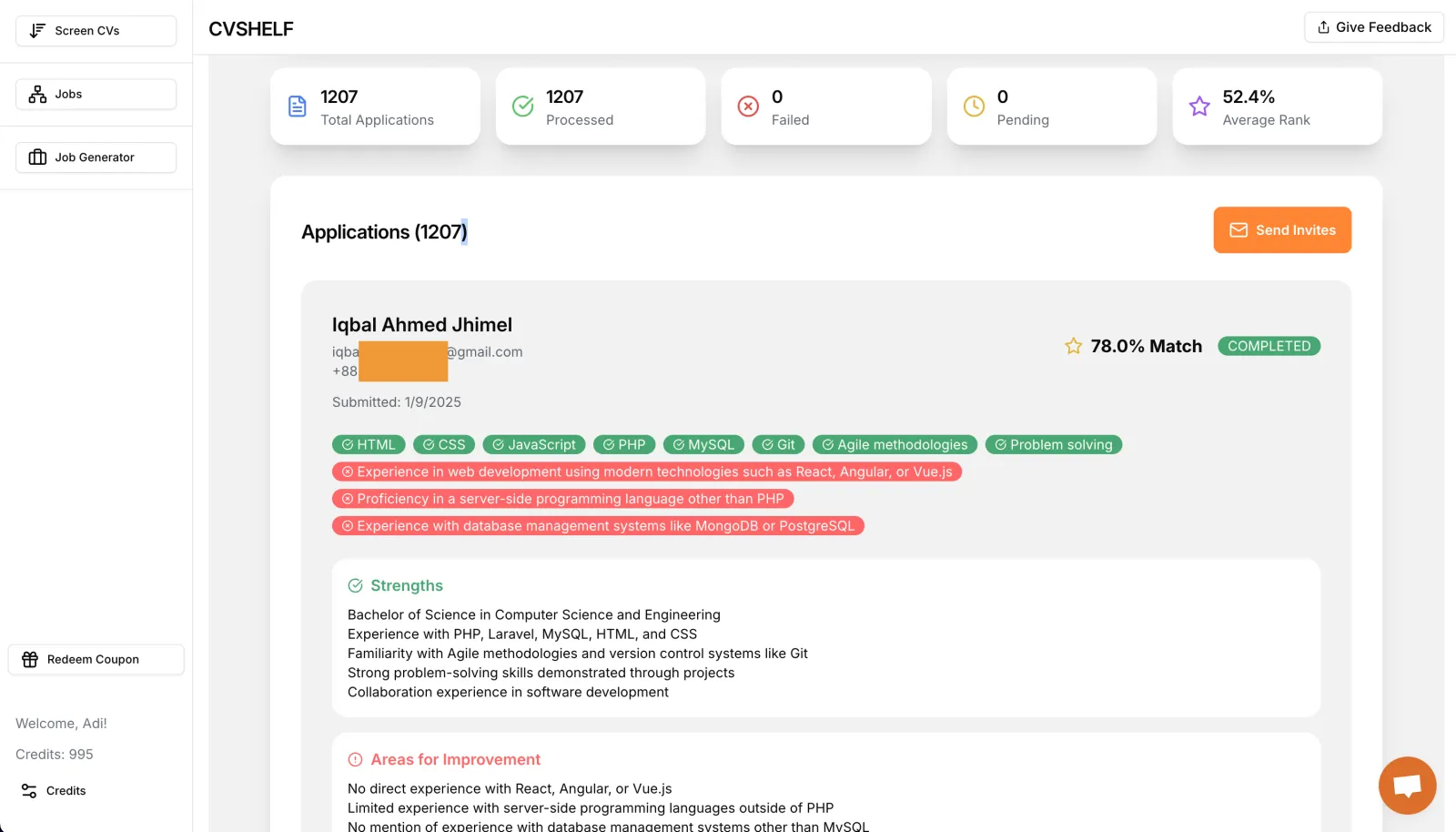
How CVShelf's AI Resume Screening Works
Stop reviewing resumes one by one. Move from an unmanageable stack of applications to a shortlist you can defend in three steps.
Bulk Upload or Import
Drop in hundreds of CVs in PDF, DOC, or DOCX formats, or import all active candidates from your LinkedIn job posts in one click.
Set Role Criteria
Define your must-have technical skills, minimum years of experience, domain knowledge, and certifications. Weight what matters most.
Review Ranked Shortlists
Get a ranked candidate table with match percentages and written explanations for every score. Download reports or trigger email outreach.
CVShelf vs Manual Screening vs Traditional ATS
See why boutique recruitment agencies and hiring managers switch to CVShelf for high-volume screening.
| Workflow Feature | Manual Screening | Legacy Keyword ATS | CVShelf AI Screening |
|---|---|---|---|
| Time to screen 500 CVs | 15 - 20 hours | 3 - 5 hours (manual parsing) | 3 - 5 minutes (background) |
| Scoring Intelligence | Fatigued, subjective review | Exact keyword match only | Contextual AI & semantic skills matching |
| Score Transparency | No standardized notes | Opaque pass/fail black box | Written explanation for every candidate score |
| LinkedIn Job Applicants | Manual resume downloads | Requires expensive Recruiter seats | 1-click direct applicant import |
| Setup & Learning Curve | None | Weeks of enterprise onboarding | Instant setup in 2 minutes |
| Cost | High recruiter labor cost | $300 - $1,500 / month | 50 CVs free/mo, then from $15.99/mo |
Core Capabilities of CVShelf AI Resume Screening
Everything you need to handle high-volume applicant pipelines without losing quality or oversight.
Bulk CV Uploads
Upload up to 1,000+ candidate CVs at once in PDF, DOC, or DOCX. Processing runs automatically in the background while you focus on interviews.
Learn about background screening →Explainable AI Reasoning
No black box algorithms. CVShelf gives you clear, readable justifications for why a candidate received their ranking, referencing actual experience in the CV.
See ranking explanations →LinkedIn One-Click Import
Connect your LinkedIn job posts directly. CVShelf pulls all incoming applicant resumes and runs them through your scoring pipeline automatically.
Explore LinkedIn screening →Custom Role Weighting
Set your own custom criteria for each role. Prioritize must-have requirements over nice-to-haves and adjust criteria weights in seconds.
Explore custom criteria →Downloadable Candidate Reports
Generate clean, professional candidate scorecards and summary reports to share directly with hiring managers, founders, and agency clients.
View detailed reports →Automated Candidate Outreach
Save hours of manual emailing. Shortlist your top tier and let CVShelf trigger personalized email outreach and next-step invitations.
Explore automated outreach →Frequently Asked Questions About AI Resume Screening
Answers to common questions about accuracy, workflow, LinkedIn screening, and data privacy.
What is AI resume screening?
AI resume screening is the automated use of artificial intelligence and natural language processing to evaluate, score, and rank candidate resumes against role requirements. CVShelf compares candidate CVs to your job description and custom criteria, producing a ranked shortlist with clear explanations for each score.
How does CVShelf's AI resume screening work?
You simply upload resumes in bulk (PDF, DOC, DOCX) or import applicants directly from a LinkedIn job post. Enter your job description and custom criteria. CVShelf's AI reads each CV in the background, scores candidates, and generates a ranked dashboard with written explanations for why each applicant matched or missed the criteria.
How is AI screening different from traditional ATS keyword filters?
Traditional ATS filters rely on exact keyword matches and frequently discard qualified candidates who use different synonyms. CVShelf uses modern contextual AI that understands transferable skills, career progression, and nuanced experience, providing transparent reasoning rather than opaque pass/fail keyword filtering.
Can I screen LinkedIn applicants automatically?
Yes. CVShelf features LinkedIn one-click screening. You can connect your LinkedIn account, select an active job post, and automatically import and screen all applicants against your hiring criteria without needing an expensive LinkedIn Recruiter subscription.
How many CVs can I screen at once?
CVShelf supports bulk uploads of hundreds to thousands of CVs at once. Processing runs in the background so you can close your tab and return to a complete ranked shortlist. The Free plan includes 50 CVs per month, and paid plans scale up to 12,000 CVs per month.
Is AI resume screening GDPR compliant and fair?
Yes. CVShelf applies consistent, job-relevant criteria to every candidate to minimize human fatigue and subjective bias. CVShelf keeps final shortlist and hiring decisions strictly in human hands with explainable scoring reports and adheres to data privacy standards.
Can I try CVShelf's AI resume screening for free?
Yes. CVShelf offers a permanent Free tier that includes 50 CV screening credits each month with no credit card required. Paid plans start at $15.99/month for 1,000 credits.
Ready to Screen Your Next 1,000 Resumes in Minutes?
Start with 50 free CV screening credits per month. No credit card required. Upgrade as your hiring volume scales.