Screen LinkedIn Applicants without LinkedIn Recruiter
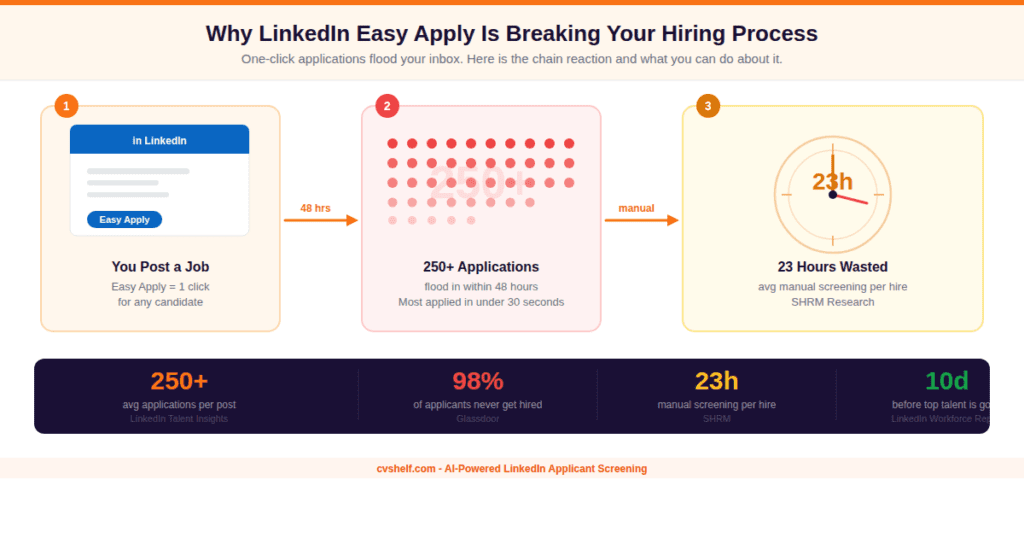
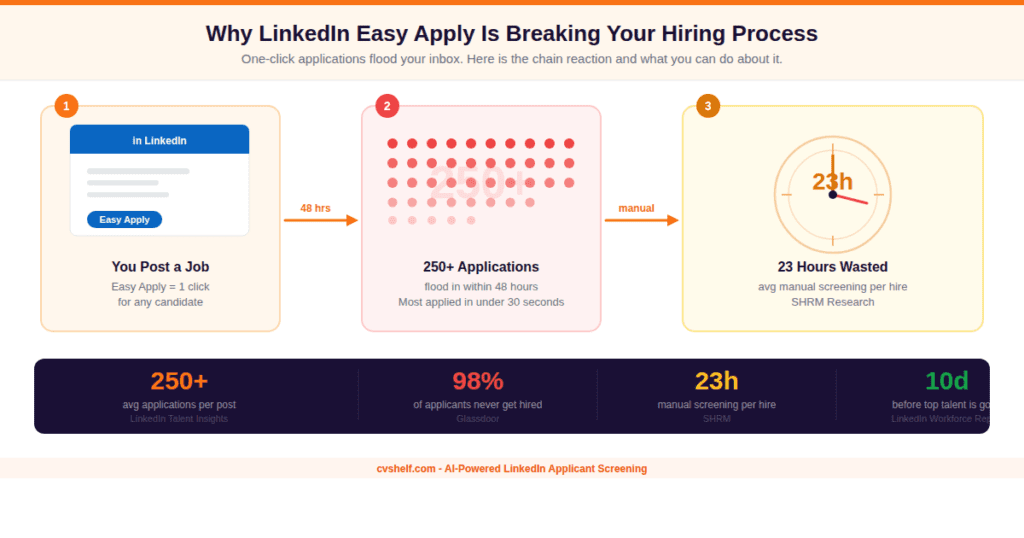
You posted a job on LinkedIn. Within 48 hours, you have 200 applicants. You open the first one, then the second, then close your laptop and stare at the ceiling.
You posted a job on LinkedIn. Within 48 hours, you have 200 applicants. You open the first one, then the second, then close your laptop and stare at the ceiling.
Sound familiar?
LinkedIn Easy Apply turned job applications into a one-click action. That’s great for candidates. For you, as the person who has to review all of them, it’s a different story. Volume went up. Quality didn’t always follow.
And then someone tells you the solution is LinkedIn Recruiter. A tool that costs up to $9,000 per year per seat. For most small businesses, hiring managers, and independent recruiters, that’s not a solution. That’s another problem.
This guide covers how to screen LinkedIn applicants without LinkedIn Recruiter, including a fully manual method that works for smaller volumes and an automated approach that handles scale. No $9,000 subscription required.
How to Screen LinkedIn Applicants When Easy Apply Is Flooding Your Inbox
Before we get into the actual screening process, it’s worth understanding why this problem exists in the first place. Because the fix needs to match the root cause.
LinkedIn introduced Easy Apply to reduce friction for job seekers. One click, pre-filled profile information, submitted. The intent was good. The outcome for recruiters has been messier.
That last stat is worth sitting with for a second. Out of 250 applications, roughly 2% go to interview. Which means 98% of your screening time is spent on applicants who won’t get hired.
The goal of a good screening system is to find that 2% as fast as possible without accidentally burying a great candidate in the pile.
The One-Click Problem Nobody Talks About
Easy Apply removes the intentionality from applying. When applying takes 8 seconds, people apply to dozens of roles they’re only vaguely qualified for. Nobody blames them. It costs them nothing to try.
What that means for you is a queue full of applications from people who matched a keyword or two but didn’t read the actual job description carefully. You now have to do the reading they didn’t.
LinkedIn’s built-in screening questions help a little. You can add knockout questions to your posting, things like “Do you have 3+ years of experience in X?” but they’re basic filters, not a real screening system.
You still have to open each application manually, review the attached resume or LinkedIn profile, and make a judgment call.
At 30 applicants, it’s manageable. Once it hits 150, you start skimming. By 300, you’re just guessing.
Why Qualified Candidates Get Missed in the Flood
Here’s the part that actually hurts. It’s not just the bad applicants causing problems. The volume means good candidates get missed too.
When a recruiter is on application number 180, attention drops. Decision fatigue sets in. Resumes that would have caught their eye early in the process get overlooked by the end.
Studies on hiring bias consistently show that sequential review order affects outcomes. The candidates who applied on day one statistically get more attention than those who applied on day three.
That’s not a people problem. That’s a process problem. And it’s exactly the kind of thing a structured screening system solves.
What LinkedIn Recruiter Actually Costs You (And What You Get)
LinkedIn Recruiter gets recommended constantly as the solution to application overload. The assumption is that paying more for LinkedIn gives you better tools to manage applicants. Let’s look at what you’re actually buying.
The Real Price Tag
Neither LinkedIn Recruiter nor Recruiter Lite automatically ranks, scores, or screens your applicants by job fit. They help you find and contact candidates proactively. They do not solve the problem of reviewing and ranking inbound applications. You still open each one manually.
Who LinkedIn Recruiter Actually Makes Sense For
LinkedIn Recruiter is built for outbound recruiting at scale. If your team is sourcing 50+ candidates per month through proactive outreach, sending InMails, building talent pipelines, and running searches across LinkedIn’s entire database, then yes, it earns its cost.
If your goal is to manage and screen the applicants already applying to your job posts? LinkedIn Recruiter doesn’t solve that problem. You’re paying for sourcing features you may not even need.
Most small businesses and hiring managers who post jobs on LinkedIn and get flooded with applicants don’t need LinkedIn Recruiter. They need a better way to handle what’s already coming in.
How to Screen LinkedIn Applicants Without LinkedIn Recruiter: The Manual Method
If you’re working with a volume under 50 applicants per posting, a structured manual process can work. The key word is structured. Random, gut-feel review at any volume produces inconsistent results and missed hires.
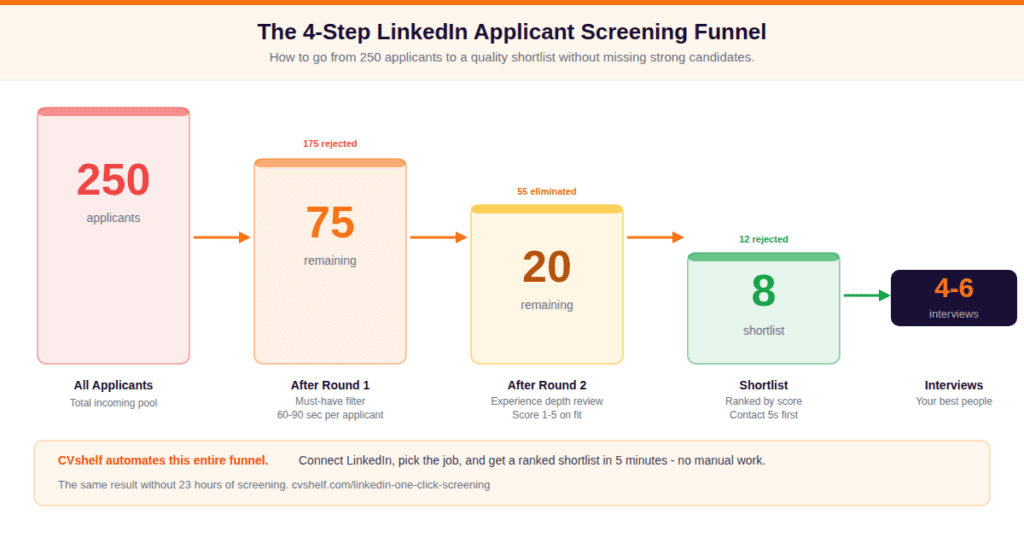
Here’s a 4-step system that makes manual LinkedIn applicant screening as efficient as possible.
Define Your Screening Criteria Before You Open a Single Application
This is the step most recruiters skip. Without pre-defined criteria, every application becomes a judgment call from scratch. Before you look at applicant number one, write down your must-haves and nice-to-haves.
- Must-haves: Non-negotiable qualifications. Missing any one = immediate rejection.
- Nice-to-haves: Desirable but not dealbreakers. Used to rank candidates who pass the must-have filter.
Export Your Applicants and Build a Simple Tracking Sheet
LinkedIn lets you download a CSV of applicant data from your job posting dashboard. Add four columns to that sheet:
- Must-Have Check: Yes / No / Unknown
- Fit Score: 1–5 based on nice-to-haves
- Status: Screen / Hold / Reject
- Notes: One-line summary of your reasoning
Screen in Rounds, Not All at Once
Do not read every resume thoroughly in one pass. That’s where recruiters burn out and start missing good candidates.
- Round 1: Must-have check only. 60–90 seconds per applicant. Eliminates 50–70% instantly.
- Round 2: Deeper review of everyone who passed Round 1. Score on nice-to-haves.
- Round 3: Compare scores. Decide who gets a phone screen.
Score and Rank Your Shortlist Before Booking Interviews
Use the scoring rubric below to assign every remaining candidate a number. Highest scores get contacted first. No gut-feel decisions, no order bias.
This system takes more setup time upfront but saves you hours in the actual review process. More importantly, it keeps your decisions consistent from the first application to the last.
If you want to go deeper on how resume screeners work and what criteria make the most impact, that breakdown covers the mechanics in detail.
The Honest Problem With Manual LinkedIn Applicant Screening
The manual method above works. But it has a ceiling.
Here’s the math. If you have 150 applicants and spend just 5 minutes on each in Round 1, that’s 12.5 hours of work just to sort through the first pass.
At a fully loaded hourly rate of $30 for a recruiter, that’s $375 in labor cost for one job posting, before you’ve even booked an interview.
Beyond time, there’s the accuracy issue. Human reviewers get fatigued. The quality of decision-making drops after extended periods of resume review.
Research from Applied Cognitive Psychology shows that decision quality in repetitive evaluation tasks deteriorates significantly after 30 to 40 consecutive reviews. Most recruiting pipelines don’t have that kind of built-in check.
Top candidates are typically off the market within 10 days of starting their search. Every day your screening process takes is a day a qualified candidate is also talking to your competitors. Speed of review is not just an efficiency problem. It’s a talent access problem.
The manual method is a solid foundation. But if you’re posting multiple roles, handling 100+ applications per post, or working without a dedicated HR team, it will become the bottleneck in your hiring process. At that point, you need a different approach.
How to Screen LinkedIn Applicants Automatically (Without LinkedIn Recruiter)
Automated LinkedIn applicant screening is not complicated. The technology has caught up to the point where you don’t need enterprise software or a LinkedIn Recruiter license to screen applicants intelligently.
Here’s what it looks like in practice.
What Automated Screening Actually Does
A proper AI applicant screening tool reads each candidate’s resume or LinkedIn profile against your job description, scores them based on how well they match, and returns a ranked list with the strongest candidates at the top.
It doesn’t guess. It evaluates the same criteria for every candidate, at the same level of attention, regardless of whether it’s candidate 1 or candidate 500. Without fatigue, order bias, or skimming.
The output is a shortlist you can trust, not a pile you have to sort through by hand.
How CVshelf’s LinkedIn One-Click Screening Works
From LinkedIn Job Post to Ranked Results in 3 Steps
Step 1: Connect Your LinkedIn Account
Select the LinkedIn account with your active job postings. One-time setup. CVshelf accesses your jobs directly, no manual export needed.
Step 2: Select the Job to Screen
Pick the LinkedIn job posting you want to process. CVshelf automatically imports all applicants from that posting. You download nothing.
Step 3: Review Ranked Results
CVshelf screens every applicant against your criteria and returns a ranked dashboard. Top matches first. Full score explanations included.
What You See in the Results Dashboard
After screening, CVshelf returns a ranked list of all your applicants. Each candidate has a match score based on how well they align with your job description, plus a detailed explanation of why they received that score. Which skills matched, which requirements were met, which ones were missing.
This matters because a score without reasoning is just a number. You need to know why someone is ranked third before you decide whether to move them forward or skip them.
From the dashboard, you can review top matches first, ignore the bottom of the list unless you want to dig in, and move candidates to the next stage directly.
No copy-pasting between tools. No switching back to LinkedIn to find the original profile.
For a side-by-side look at how different AI screening tools compare before you commit to one, the guide on how to choose an AI resume screener covers the key evaluation criteria in detail.
LinkedIn Applicant Screening Mistakes That Cost You Good Hires
Even with the right process or tool in place, there are patterns that consistently cause good candidates to slip through the cracks. Here are the most common ones.
The One Mistake That Beats All the Others
If there’s a single mistake that causes the most damage, it’s waiting too long to build a screening system until you absolutely need one.
Most recruiters and hiring managers build their process in response to a hiring disaster. A critical role that took four months to fill.
A strong candidate who accepted a competing offer. A bad hire who made it through because the process was disorganized.
The best time to build a screening system is before you’re drowning in applications. The second best time is right now.
“The real competitive advantage in hiring isn’t finding more candidates. It’s processing the ones you already have faster and more accurately than everyone else competing for the same people.”
Frequently Asked Questions (FAQs)
Can I screen LinkedIn applicants without LinkedIn Recruiter?
What is the cheapest way to manage LinkedIn job applicants?
How do I rank LinkedIn applicants by fit?
How long does it take to screen LinkedIn applicants manually?
Does LinkedIn have a built-in applicant screening tool?
What is the difference between LinkedIn Recruiter and Recruiter Lite?
Can I download all LinkedIn applicants at once?
The Bottom Line on Screening LinkedIn Applicants
You don’t need a $9,000 subscription to screen LinkedIn applicants properly. You need a process.
If you’re working with under 50 applicants per role, the manual 4-step system in this guide is a solid starting point. Define your criteria, export your applicants, filter in rounds, and score your shortlist. It’s not glamorous but it works.
If you’re regularly dealing with 100+ applicants, multiple open roles, or limited recruiting bandwidth, the manual approach will become the bottleneck.
At that point, automated screening is the only realistic option. Not because it’s more advanced, but because the math doesn’t work any other way.
CVshelf’s LinkedIn One-Click Screening handles the volume problem directly. Connect your account, select a job, and get a ranked results dashboard without a single manual download. No LinkedIn Recruiter license. No spreadsheet juggling. Just the shortlist you actually need, in minutes instead of hours.
For a complete walkthrough on evaluating AI screening tools before you pick one, the guide on how to choose an AI resume screener is worth reading before you commit.